


Schneider Button Application Scenarios Recommendations and Usage Instructions

Schneider Button Application Scenarios Recommendations and Usage Instructions
I. Recommended Application Scenarios
Schneider buttons, with their high quality, reliability, and diverse functionalities, are widely used in various industrial and commercial environments. Here are some typical recommended application scenarios:
-
Industrial Automation Control
- Production Line Control: On automated production lines, Schneider buttons are used for start, stop, emergency stop, and other operations to ensure smooth and safe production processes.
- Machine Control: They are used to control the startup and shutdown of various industrial machines, enhancing production efficiency.
-
Power Systems
- Circuit Breaker Control: In power systems, Schneider buttons are commonly used for closing and opening circuit breakers, ensuring stable operation of the power system.
- Distribution Room Control: They are used for various switching controls in distribution rooms, improving the convenience and safety of power management.
-
Building Automation
- Elevator Control: Used for elevator floor selection and door opening/closing control, enhancing passenger riding experience.
- Lighting System: Used to control lighting switches within buildings, achieving energy-saving and intelligent management.
-
Transportation Facilities
- Traffic Signal Control: In traffic signal systems, Schneider buttons are used to control signal switching, ensuring smooth and safe traffic flow.
- Rail Transit Control: Used for various control operations in rail transit systems, ensuring punctual and safe train operation.
II. Usage Instructions
The usage of Schneider buttons varies depending on specific models and application scenarios, but here are some general operating procedures and precautions:
-
Pre-installation Preparation
- Button Inspection: Before use, inspect the button for completeness, appearance intactness, and whether the terminal blocks are loose or damaged.
- Determine Installation Location: Select an appropriate installation location based on application scenario requirements, ensuring the button is easy to operate and observe.
-
Installation Steps
- Fix the Button: Secure the button in the installation location, ensuring it is firmly fixed without wobbling.
- Wiring: Connect the button's terminal blocks to the corresponding control circuit according to the wiring diagram. Ensure wiring is firm and reliable, avoiding loose connections or short circuits.
-
Operation Instructions
- Start/Stop Operations: For start and stop buttons, simply press the corresponding button to achieve the start or stop function. During operation, observe the device's operating status and indicator light display.
- Emergency Stop Operations: In emergency situations, quickly press the emergency stop button to cut off the device's power, ensuring personnel and equipment safety.
-
Maintenance and Servicing
- Regular Inspections: Regularly inspect the button's appearance, terminal blocks, and fixation to ensure it is in good working condition.
- Cleaning and Servicing: Regularly clean dust and dirt from the button's surface to maintain its cleanliness and aesthetics.
-
Precautions
- Avoid Misoperations: When operating buttons, be careful to avoid misoperations, ensuring the button's function is correctly implemented.
- Safety Protection: For live operations, take necessary safety precautions, such as wearing insulating gloves and shoes.
- Follow Operating Procedures: When operating buttons, follow corresponding operating procedures and safety standards to ensure operational safety and reliability.
Certainly, here are more detailed aspects regarding the application scenarios and usage instructions of Schneider buttons:
Application Scenarios with Detailed Examples
-
Industrial Machinery and Equipment
- Example: In manufacturing plants, Schneider buttons are used to control the startup, shutdown, and reset functions of various machines, such as conveyors, presses, and packaging equipment.
- Advantages: These buttons offer high reliability and durability, ensuring that they can withstand the harsh industrial environment and frequent use.
-
Production Lines in Automation
- Example: In automated assembly lines, Schneider buttons are used to control the startup, shutdown, and emergency stop of robotic arms, conveyors, and other automated equipment.
- Features: These buttons often come with indicator lights to provide visual feedback on the equipment's status, enhancing operational efficiency and safety.
-
Traffic and Transportation Systems
- Example: In traffic signal control systems, Schneider buttons are used to switch between different signal phases, such as red, yellow, and green lights.
- Importance: Proper functioning of these buttons ensures smooth traffic flow and road safety.
-
Fire Protection Equipment
- Example: In fire alarm systems and automatic sprinkler systems, Schneider buttons are used to initiate and stop alarm responses and sprinkler activations.
- Safety Aspect: These buttons play a crucial role in ensuring the timely and effective response to fire emergencies.
-
Building Automation and Control Systems
- Example: In smart buildings, Schneider buttons are used to control lighting, HVAC systems, and access control systems.
- Convenience: These buttons offer a user-friendly interface for building occupants and facility managers to control and monitor building systems.
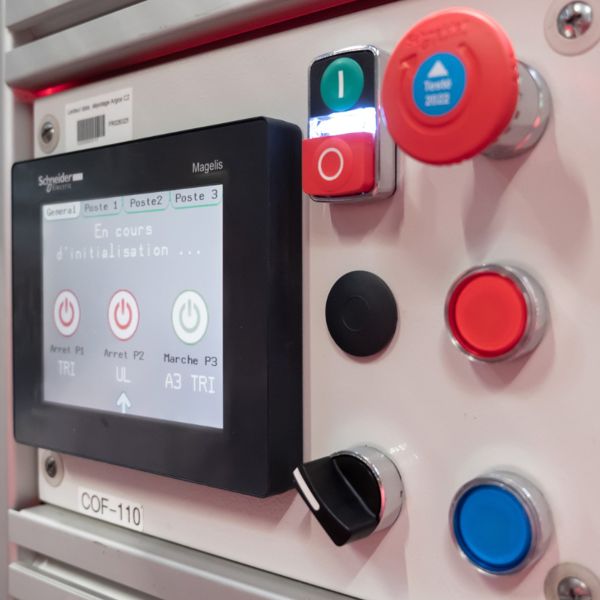
Detailed Usage Instructions
-
Button Selection Based on Application
- Opening Type: Suitable for control panels where frequent operation is required.
- Protected Type: Suitable for environments with potential exposure to dust or liquids.
- Waterproof Type: Essential for outdoor or wet environments to prevent ingress of moisture.
- Corrosion-resistant Type: Suitable for environments with corrosive gases or chemicals.
-
Button Color Coding
- Green: Commonly used to indicate "start" or "power on".
- Red: Used to indicate "stop" or "power off".
- Yellow/Orange: Often used for warning or caution buttons.
-
Installation Considerations
- Mounting: Ensure proper mounting of the button to prevent it from loosening or falling off.
- Wiring: Follow the wiring diagram provided by Schneider to ensure correct and reliable connections.
- Sealing: In harsh environments, consider using sealing materials to protect the button from dust, moisture, and other contaminants.
-
Operation and Maintenance
- Operation: Press the button firmly to ensure proper activation. Avoid excessive force to prevent damage.
- Cleaning: Regularly clean the button surface with a soft cloth to remove dust and dirt.
- Inspection: Regularly inspect the button for any signs of wear, damage, or malfunction. Replace it if necessary.
-
Safety Precautions
- Lockout/Tagout: Follow proper lockout/tagout procedures when working on equipment that uses Schneider buttons to prevent accidental startup.
- Emergency Stop: Familiarize yourself with the location and function of emergency stop buttons in your workplace.
- Personal Protective Equipment (PPE): Wear appropriate PPE when working in environments where there is a risk of electrical shock or other hazards.
